Ticket Example : XXQ-566-36068
SPF (Sender Policy Framework) is a simple email-validation system designed to detect email spoofing by providing a mechanism to allow receiving mail exchangers to check if incoming mail comes from a host authorized by that domain’s administrators. It also identify which mail servers are permitted to send email on behalf of your domain. Below are some of the steps you can apply to setup SPF. Note that a SPF record is a TXT record which contain all authorized ip addresses.
We can use online tools such as https://dnsviewer.org to verify the SPF records exist or not, or we can use the following command dig to check,
[root@localhost ~]# dig @8.8.8.8 google.com txt
and the output should as below,
; <<>> DiG 9.8.3-P1 <<>> @8.8.8.8 google.com txt

; (1 server found)

;; global options: +cmd

;; Got answer:

;; ->>HEADER<<- opcode: QUERY, status: NOERROR, id: 59141
;; flags: qr rd ra; QUERY: 1, ANSWER: 1, AUTHORITY: 0, ADDITIONAL: 0

;; QUESTION SECTION:
;google.com.			IN	TXT

;; ANSWER SECTION:
google.com.		3599	IN	TXT	"v=spf1 include:_spf.google.com ~all"

;; Query time: 436 msec
;; SERVER: 8.8.8.8#53(8.8.8.8)
;; WHEN: Fri Sep 15 15:01:16 2017
;; MSG SIZE  rcvd: 76
or you can use command nslookup to check,
[root@localhost ~]# nslookup

> server 8.8.8.8

Default server: 8.8.8.8

Address: 8.8.8.8#53

> set q=txt

> google.com

Server:		8.8.8.8

Address:	8.8.8.8#53
Non-authoritative answer:
google.com text = "v=spf1 include:_spf.google.com ~all"
Authoritative answers can be found from:
>
If the SPF record is not configured, you will find that the TXT record is empty. In order to setup SPF in the TXT record, go to terminal and ssh to the ip address. Then, check on the recipient's email log, type
cat exim/mainlog | grep
Next, go to web browser and browse for Web Host Manager by typing the IP address and login. Click “list account” in the drop-down list and search for the domain.
Press the “+” sign beside the domain name and click on the “modify” button. Find DNS setting to enable SPF and DKIM and copy the SPF line
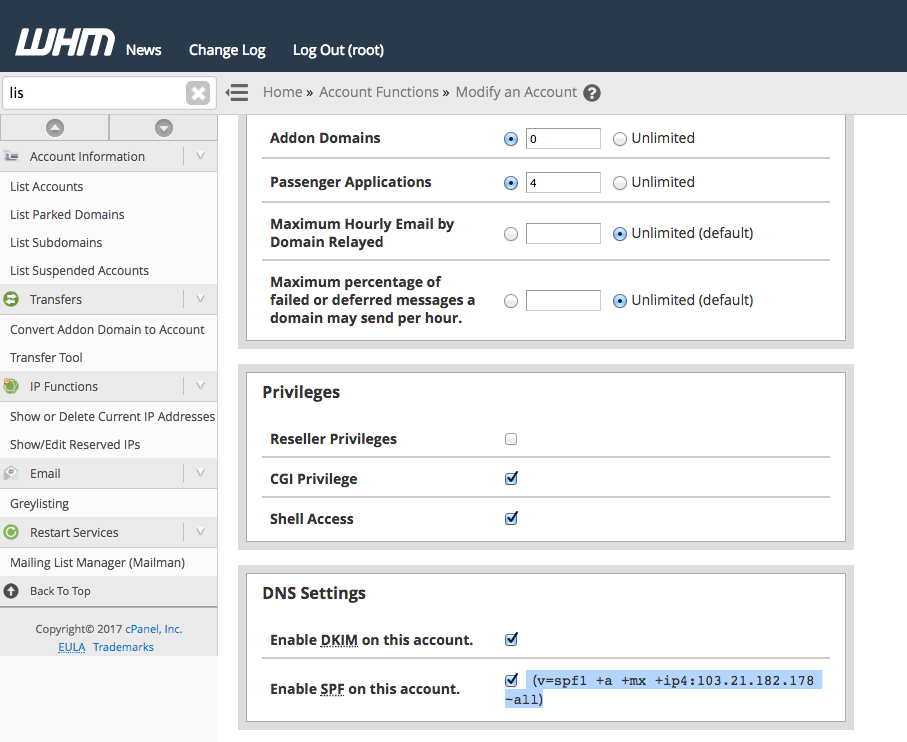
Next step, https://dns.ipserverone.com/ and login. Search for the domain and click on the edit icon. Add the copied spf , click save changes

Do not forget to to change the softfail (~all) to hardfail(-all) of the TXT record. Click "save changes".
Please note that softfail is "~all" which means that your domain can still be spoofed because most email servers allow mail to still go through with that error. A complete fail is "-all" which means if it doesn't come from any of the assigned IP's or MX its fake and do not trust it.
Lastly, check if spf has added or not, type
dig starplanet.com.my TXT
Result
husna-localhost:~ husna$ dig starplanet.com.my TXT
; <<>> DiG 9.8.3-P1 <<>> starplanet.com.my TXT
;; global options: +cmd
;; Got answer:
;; ->>HEADER<<- opcode: QUERY, status: NOERROR, id: 64698
;; flags: qr rd ra; QUERY: 1, ANSWER: 1, AUTHORITY: 0, ADDITIONAL: 0
;; QUESTION SECTION:
;starplanet.com.my. IN TXT
;; ANSWER SECTION:
starplanet.com.my. 299 IN TXT "v=spf1 +a +mx +ip4:103.21.182.178 -all"
;; Query time: 34 msec
;; SERVER: 192.168.30.1#53(192.168.30.1)
;; WHEN: Fri Sep 15 17:53:02 2017
;; MSG SIZE rcvd: 86